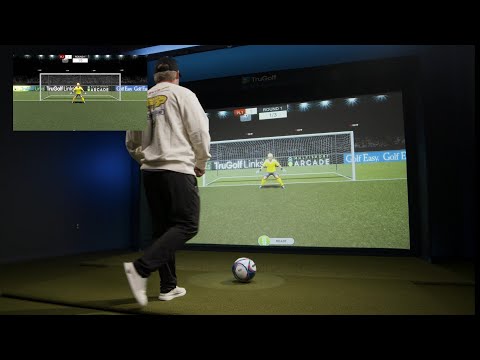
 Breakaway Soccer in action
Quick Start
From dark screen to first game in about a minute.
- Turn on the projectorUse the projector remote.
- Turn on the cameraFlip on the Arcade camera with its remote power switch.
- Open the game menuWake the computer and open the E6 launcher.
- Pick a game and grab your gearChoose a game, set your players and difficulty, then grab the matching equipment from the shelf or basket.
- Make room to playPush the pool table back a bit to open up the floor, then play from the open space facing the screen so the system can pick up the balls.
How to Aim
The secret: aim THROUGH the screen
The targets aren't on the screen. They're out in the game world beyond it. Throw, kick, or hit to the target like it's really there, not at the screen.
- 💪Go hard. Throw and kick with real intention. Soft taps often won't register. (Corn Hole is the one game where you lob.)
- ⚽Soccer: Kick like you're shooting at a real goal 36 feet away.
- 🔥Inside Heat is the exception: Aim straight at the green target on the screen.
- 🎯Corn Hole: Lob the beanbag just like the backyard game.
- 🏀Hoops: Push the ball toward the hoop instead of arcing it, so you don't hit the ceiling.
- 🗣️Voice commands: Rally Baseball, Soccer, Zombie Dodgeball, and Hockey have hands-free commands. The game shows you the words. Speak loud and clear from where you play.
The Games
Every game has multiple modes and 3 difficulty levels. Many support up to 8 players.
Breakaway Soccer Kick
Penalty Kick, Target Practice, and Passing modes.
Foot Golf Kick
Kick your way around 4 courses and chase par. Demolition Mode blows up moving targets.
Field Goal Frenzy Kick
The game is on the line. Get the kick off after the snap before the defense tackles you.
Rally Baseball Hit
A home-run derby with voice-activated pitching and swing-timing power boosts.
Inside Heat Throw
Take the mound, paint the corners, and strike out the lineup.
Slapshot Hockey Hit
Goalie, Target Practice, Blackout, and Long Shot modes.
Quarterbacks Throw
Pick a play, read the defense, and complete the pass.
Zombie Dodgeball Throw
A kid-friendly Ghost Hunt, then Frozen Zombies and Zombie Pirates. Great for families.
Hoops Toss
Arcade basketball with 3 modes of play.
Corn Hole Toss
Classic Corn Hole, Tic Tac Toe, or 301, single or multiplayer.
Bowl-a-Rama Roll
10 frames for up to 8 players. Turn on bumpers for little ones.
Disc-Go Golf Toss
4 disc golf courses plus Disc-Struction Mode with explosive targets. Up to 8 players.
Wild West Shooting Gallery Light Gun
A Western rail shooter. See who has the aim of a deadeye.
Wilderness Hunter Light Gun
Upland Slam and Skeet modes with adjustable difficulty.
Watch & Learn
A few clips to get you in the game.
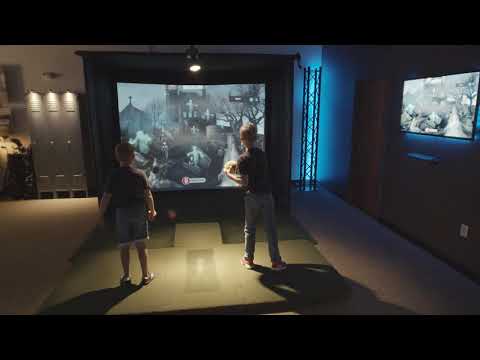 Zombie Dodgeball
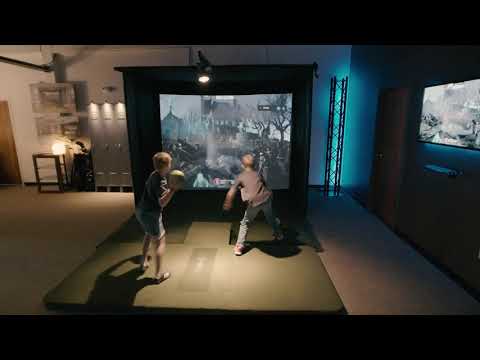 Baseball & Soccer
Equipment
- 🧺Everything lives on the shelf and in the basket. Please use only the house equipment. The camera is tuned to see it, and outside or dark-colored balls may not register.
- 🏏Foam bat only. No hard bats in the arcade room.
- 🔫The toy shotgun is only for Wild West Shooting Gallery and Wilderness Hunter.
Safety First
- ⛔Clear the lane. Nobody between the player and the screen before any throw, kick, or swing.
- ☝️One player up at a time. Everyone else waits behind the player.
- 👀Watch the little ones. Kids should always have an adult in the room.
- 📷Don't aim at the ceiling camera. It's what makes the games work.
- 💡Keep the lights as they are. The camera needs some light to see the ball, so don't play in total darkness.
When You're Done
- Exit the gameGo back to the main menu. Please don't leave games running.
- Turn off the cameraUse the remote power switch.
- Turn off the projectorUse the projector remote.
- Put the gear backReturn everything to the shelf and basket.
Need a Hand?
Tap a problem for a quick fix.
Shots aren't registering
- Make sure the pool table is pushed back and you're playing from the open floor facing the screen.
- Use house equipment from the shelf or basket.
- Throw or kick harder, with intention.
- Check that the room lights are on at their normal level.
The game froze or the camera disconnected
- Close the game.
- Turn the camera off with the remote switch, wait 10 seconds, then turn it back on.
- Reopen the game.
It's counting shots nobody took
- Close the blinds or dim extra lights. Sunlight can confuse the camera.
- Move any shiny or reflective items out of the play area.
Voice commands aren't working
- Face the screen and speak loudly and clearly.
- Keep the room noise down for a moment while you give the command.
Please don't change the settings
The camera is calibrated for this room. If the games feel way off, reach out and we'll get it sorted.